
Trikaan
  • Anvaya

    AnvayaConnected business operations - supply chain, sales, finance, HR and more on one platform.

    ASTR AI Suite

    ASTR ProductionProduction intelligence - recipes, smart BOM, costing, planning and quality.Astr AIThe AI layer across every Trikaan product - ask, analyse and automate in plain language.ASTR Drawing & Plan GeneratorTurn customer drawings into BOM, BOQ, cutting lists and production plans.ASTR Reporting AssistantAsk in plain language - get reports in Excel, PDF, CSV or PPT in seconds.Machine Digital TwinLive machine models connected to PLC & SCADA data for OEE and maintenance.

    Agriculture

    Seed TrackField intelligence for seed production - growers, fields, visits, QA and yield.
    Not sure which product fits your business?Book a Demo →
  • Industries

    FurnitureFrom concept to engineering, powered by AI.FMCGFrom product planning to market execution.PharmaceuticalFrom formulation to compliance.AutomotiveFrom component design to vehicle manufacturing.Food & BeverageFrom ingredients to finished products.ConstructionFrom project planning to execution.ChemicalFrom chemical formulation to process optimisation.Agri & SeedFrom grower’s field to sealed seed bag.
    Industry-specific solutions. Powered by ASTR.All industries →
  • Build & Integrate

    Software built around your process

    Workflow Digitisation & OptimisationCustom Application DevelopmentERP & Systems IntegrationMobile & Field ApplicationsData Migration & Legacy Modernisation

    Engineering & Automation

    From drawings to the shop floor

    Drawing-to-Production EngineeringPLC, SCADA & Hardware IntegrationDigital Twin & 3D Plant ModellingPredictive Maintenance & OEEAI Reporting & Analytics

    Operations

    Run the business on connected data

    Procurement & Supply ChainInventory & Warehouse SolutionsProduction Planning & SchedulingQuality & Compliance SystemsCosting & Margin Intelligence

    Industry Services

    Industry-focused services

    Manufacturing SolutionsAgri & Seed SolutionsConstruction & Interior SolutionsImplementation, Training & Support
    Beyond software - we engineer around your business.All services →
  • Engineering

    How We WorkEngineeringData SecurityData PrivacyCloud & Hosting

    Your vision. Our engineering.

    Explore our engineering capabilities →
  • Pricing
  • FAQ
Book a Demo
  • Home
Trikaan

Your Business. Connected Through Intelligence.

Company

Who we areHow we workEngineeringPricingCareersBlogContact

Solutions

Seed TrackAnvayaASTR ProductionASTR DrawingASTR ReportingMachine Digital TwinIndustries

Services

All servicesWorkflow DigitisationSystems IntegrationPLC & SCADACustom EngineeringNetwork Security & VPN

Trust & Legal

Data securityData privacyCloud & hostingPrivacy PolicyTerms of ServiceCookie Policy

© 2026 Trikaan Solutions Pvt. Ltd. All rights reserved.

PrivacyTermsCookies
  • Seed Track
  • Web & app
  • Farmer onboarding
  • Field mapping
  • Offline
  • Modules
  • Crop lifecycle
Seed Track by Trikaan

Every farmer. Every field.
Tracked as one.

Seed Track is a web portal for your office and a mobile app for your field team. Onboard farmers, map fields by walking or drawing them — even offline — distribute seed, run surveys, verify every visit and follow each crop from sowing to harvest.

Start 7-day free trial See field mapping
  • Web portal
  • Mobile app
  • Farmer onboarding
  • Walk & draw mapping
  • Offline maps
  • Seed distribution
  • Surveys
  • Visit verification
  • Crop stages
  • Harvest & procurement
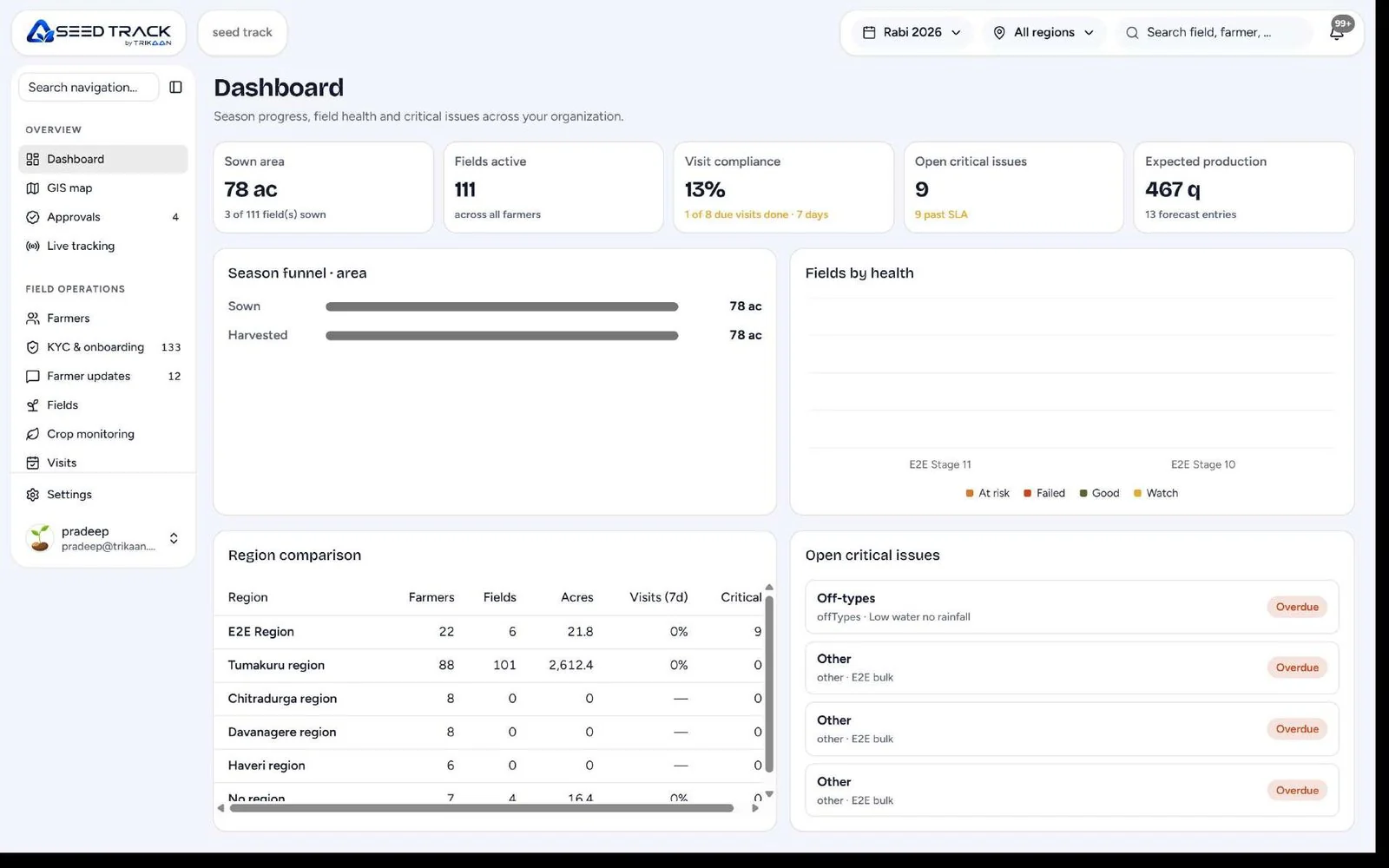
Seed Track web portal dashboard — sown area, fields active, visit compliance, critical issues and region comparison

Two surfaces. One source of truth.

Web portal · for the office

Plan, approve and analyse.

  • Dashboard — farmers, acreage, visits and crop status by region.
  • Farmer approvals — review KYC, land and bank details before activation.
  • Season planning — target acreage by variety, region and supervisor.
  • Visit planning — assign routes and visit schedules to field teams.
  • Seed lots & stock — lots, distribution points and balances.
  • Survey builder — design forms without code and push them to the app.
  • Live team map — see where supervisors are during working hours.
  • Map review — check every field boundary on satellite view.
  • Reports & exports — region, crop and supervisor reports in Excel or PDF.
  • Users & roles — regions, teams, permissions and languages.

Mobile app · for the field

Capture it where it happens.

  • Farmer onboarding — register farmers with photos and documents.
  • Field mapping — walk, draw or hybrid boundary capture.
  • Offline maps — download an area and work without network.
  • Seed issue — record lot and quantity, acknowledged by OTP or signature.
  • Visit check-in — GPS-verified arrival at the registered plot.
  • Stage checklists — crop stage, pest, plant stand and photos.
  • Surveys — fill any survey the office publishes.
  • Harvest entry — yield, moisture and collection details.
  • Local language — the app in the language your team speaks.
  • Auto sync — everything syncs when network returns.

Farmer onboarding

A farmer registered, verified and allocated seed — in one visit.

Field officers onboard farmers on the app, with or without network. The office approves on the web portal.

  1. 1Basic detailsName, mobile, village and photo — with duplicate check by mobile number.
  2. 2KYC & documentsIdentity and land documents photographed and attached to the profile.
  3. 3Land & bank detailsHoldings, irrigation source and bank account for payments.
  4. 4Map plotsEach plot mapped by walking or drawing — area calculated automatically.
  5. 5Agreement & seed allocationProduction agreement, variety, lot and quantity allocated to each plot.
  6. 6Office approvalThe portal reviews and approves — the farmer is active and visits are scheduled.
New farmerStep 1 / 6

Basic details

Farmer name

Ramesh K.

Mobile

+91 98xxx xxx21

Village

Hosur, Taluk 3

Photo

Captured ✓

Next: documents

Field mapping

Walk it, draw it, or both.

Three ways to mark a field, on three map views — all working offline once the area is downloaded.

Mapping mode

Walk the boundary

The supervisor walks the field edge and GPS points are captured continuously. The polygon closes when they return to the start.

  • Continuous GPS capture with accuracy shown
  • Pause and resume for obstacles
  • Auto-close when back at the start point
  • Most accurate for irregular fields

Map view

Imagery with roads and labels on top — the most used view.

Map field · Plot 3 Offline map
CanalVillage road

2.4 acres

Walked · 312 m perimeter

Points

118

Accuracy

± 3 m

Time

6 min

Offline first

No network in the field? Nothing stops.

  • Offline map packs

    Download a village or cluster before going out; maps work with no signal.

  • Offline forms

    Onboarding, surveys and checklists open and save without network.

  • Queued sync

    Records upload in order when the phone reconnects — nothing is lost.

  • Offline verification

    GPS, timestamp and photos are captured on the device at the time of the visit.

  • Conflict handling

    If two people edit the same farmer, the office sees both and chooses.

  • Low-end phones

    Designed for entry-level smartphones and patchy networks.

  • Battery-aware GPS

    Location sampling adjusts to save battery on long field days.

  • Sync status

    Every record shows whether it is saved locally or synced.

Everything in Seed Track

From registration to harvest, nothing lives in a notebook.

  1. 1Web + App

    Farmer management

    • Farmer profiles with photo and documents
    • Family, land holdings and bank details
    • Duplicate detection by mobile and ID
    • Agreements and seed-production contracts
    • Full history of visits, supplies and payments
  2. 2Web + App

    Farm & plot registration

    • Plots mapped by walk, draw or hybrid
    • Crop, variety and seed lot per plot
    • Soil, irrigation and previous crop
    • Area calculated from the map
    • Plot photos over the season
  3. 3Web + App

    Seed distribution

    • Lots issued by quantity and farmer
    • Stock at each distribution point
    • Acknowledgement by OTP or signature
    • Returns and balance tracking
    • Lot traceability to the field
  4. 4Web + App

    Surveys

    • Form builder with conditional questions
    • Photo, GPS and timestamp on every entry
    • Works offline and syncs later
    • Results by region, crop or supervisor
    • Export for analysis
  5. 5Web + App

    Visit planning & tracking

    • Planned routes per supervisor
    • GPS-verified check-in at the plot
    • Live team location during work hours
    • Missed and overdue visits flagged
    • Visit reports with photos and notes
  6. 6App

    Crop progress

    • Stage-wise checklists per crop
    • Expected versus actual stage dates
    • Pest and disease observations
    • Advisories sent back to the farmer
    • Fields at risk highlighted
  7. 7App

    Isolation & quality

    • Isolation distance checks for seed crops
    • Rogueing and off-type removal records
    • Field inspection results
    • Rejection of non-compliant plots
    • Photo evidence for each check
  8. 8Web + App

    Yield estimation

    • Crop-cutting and sample estimates
    • Expected yield per plot and region
    • Harvest date planning
    • Variance from target acreage
    • Inputs for processing plans
  9. 9Web + App

    Harvest & procurement

    • Harvest quantity and moisture per plot
    • Collection centre and vehicle
    • Weighbridge entry at the plant
    • Lot formation for processing
    • Farmer payment calculation
  10. 10Web

    Payments & advances

    • Advances and input recoveries
    • Payment calculation by quality and quantity
    • Payment status per farmer
    • Statements in local language
    • Audit trail of every change
  11. 11App

    Supervisor attendance

    • Day start and end with location
    • Distance travelled
    • Visits completed versus planned
    • Expense entries with receipts
    • Team performance on the portal
  12. 12Web

    Admin & settings

    • Regions, clusters and villages
    • Crops, varieties and seasons
    • Roles and permissions
    • App languages
    • Integrations with Anvaya and ERP

Supervisor field visits

Every visit, verified.

Visits are planned on the portal, done on the app and verified by location, time and photos — so a visit is never just a tick mark.

  1. 1Check in at the plotGPS confirms the supervisor is at the farmer’s registered field.
  2. 2Complete the stage checklistCrop stage, germination, pest check and photos — tagged to the plot.
  3. 3Give an advisoryRecommendations recorded and shared with the farmer.
  4. 4Sync and verifyBack in network, the visit syncs and the portal updates for the office team.
Visit · F-1042 Online

Grower · Plot 3 · Hybrid maize, Lot SL-24-118

Plot 3

Checked in · 09:42

Location verified

Farmer present

Inside boundary

Start checklist

Follow every crop, stage by stage.

Each stage carries its own checklist, expected timing and photos — so you know which fields are on track and which need a visit.

  1. Stage 1 · Day 0

    Sowing

    • Seed lot confirmed
    • Sowing date recorded
    • Plot photo
  2. Stage 2 · Day 7–12

    Germination

    • Germination %
    • Gap filling need
    • Irrigation
  3. Stage 3 · Day 15–40

    Vegetative

    • Plant stand
    • Pest & disease
    • Fertiliser applied
  4. Stage 4 · Day 45–60

    Flowering

    • Isolation distance
    • Rogueing done
    • Off-types removed
  5. Stage 5 · Day 80–100

    Maturity

    • Moisture check
    • Yield estimate
    • Harvest date planned
  6. Stage 6 · Day 100+

    Harvest

    • Quantity harvested
    • Lot dispatched
    • Farmer payment due

Reports the office actually uses.

Every report filters by region, crop, variety, season and supervisor — and exports to Excel or PDF. Ask ASTR in plain language for anything else.

How ASTR Reporting works
  • Farmer register

    active, pending and rejected by region

  • Acreage by variety

    target vs registered vs mapped

  • Visit compliance

    planned vs done by supervisor

  • Crop stage status

    plots on track and delayed

  • Seed distribution

    issued, returned and balance by lot

  • Survey results

    responses by question and region

  • Yield estimates

    expected yield by region and variety

  • Harvest & procurement

    collected quantity and quality

  • Payments

    due, paid and recoveries

  • Team attendance

    days, distance and visits

  • Offline first

    Visits, surveys and maps are saved on the phone and sync when network returns.

  • Geo-verified

    Every visit carries GPS, time and photos — no visit is just a tick mark.

  • Role-based access

    Supervisors, managers and office teams each see what they need.

  • Complete audit trail

    Every change to a farmer, plot or lot is logged.

Start free. Scale on your terms.

Every Trikaan product starts with a 7-day free trial. Continue on a subscription, or let us customise it around the way your business works.

  • Available for
  • Seed Track
  • ASTR AI
  • Anvaya

7-Day Free Trial

Try it first

Free

for 7 days

Explore the product with your own processes before you commit.

Start free trial

What’s included:

  • Full access to core features
  • Guided onboarding session
  • Use sample data or your own
  • Support from our team throughout the trial

Subscription

Most popular

Flexible

monthly or annual

Pay for the applications and users you need — and add more as you grow.

Choose a plan

Everything in the trial, plus:

  • Choose only the applications you need
  • Monthly or annual billing
  • Regular updates and new features
  • Role-based access and audit trails
  • Email and chat support

Customization

Built around you

Custom

scoped to your business

Workflows, applications and integrations engineered around your processes.

Talk to us

Everything in Subscription, plus:

  • Business process and requirement analysis
  • Custom workflows and applications
  • Integration with your existing systems
  • Dedicated implementation and onboarding
  • Continuous improvement

Included with every product

Data encryption · Secure database access · Role-based permissions · Complete audit trails

procurement
ASTR AI
quality
engineer
Seed Track
Anvaya
operator
finance
planner

Your Vision. Our Engineering.

Book a Demo

Powered by AI. Engineered by Trikaan.